Google Alerts is a free, simple way to keep an eye on your business online. Set up an alert in about 10 minutes and receive emails when Google finds new matching search results.
People can find information about you beyond your website and social media pages. A local article, an event recap, or a community resource list can shape their impression before they ever contact you. Knowing what is out there gives you a chance to share good publicity or address incorrect information.
Google Alerts will not catch everything, but it can help you follow mentions of your business without searching for them every day. No new dashboard to manage. Just potentially useful information in your inbox.
Start With One Alert
Go to Google Alerts.
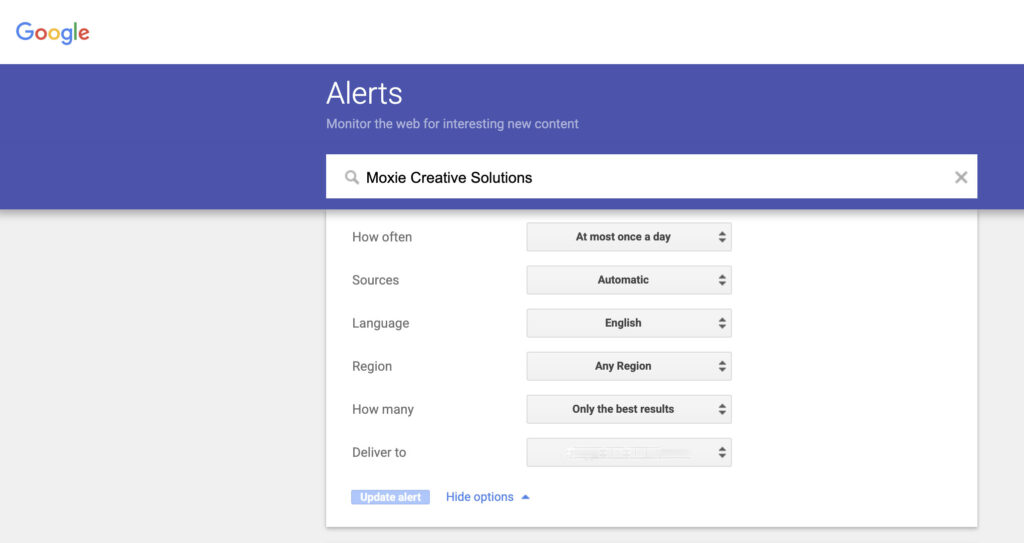
Enter your business name in quotation marks, like “Moxie Creative Solutions”.
Check the results preview to see whether the search is finding the right business.
Select Show options to choose how often you want emails and confirm where they should be sent.
Click Create Alert.
Start with your business name and see what comes in. You can always adjust the search if the results are not useful.
What Could You Find?
Maybe a local publication mentions your business. Maybe you are included in an event recap or a community resource list. An alert gives you a chance to see the mention, thank the publisher, and share it with your audience.
You might also notice incorrect information in a result. Google Alerts is not a reliable way to uncover old listings, though. Keep checking your important business listings directly.
Even one useful mention can make setting up an alert worthwhile.
Add More Alerts If They Would Help
Once you have tried an alert for your business name, you might add one for:
A variation of your business name that people commonly use
A topic your customers ask about that could give you an idea for a helpful post or email
A local event or issue connected to your work
Keep the searches specific. An alert for marketing would bury me in results. An alert for a focused topic or an exact business name is much easier to use.
You do not need to create all of these today. One useful alert beats six you never read.
What Should You Do When an Alert Arrives?
Give it a quick look and ask yourself:
Do I need to respond or correct something?
Would my customers find this worth sharing?
Is there an idea I want to save?
If the answer is no, delete the email and move on. Not every notification needs to become another task.
You can also send your alerts to a separate email folder and check them once a week. Your inbox does not need another fake emergency.

What Google Alerts Will Miss
Google Alerts is not a complete way to monitor your online reputation. It may miss social media posts, private groups, reviews, and mentions on some websites.
Keep checking the places where customers actually interact with your business, including your Google Business Profile and other important listings. Think of Google Alerts as one more set of eyes, not your entire visibility plan.
A Little Help Without a Lot of Extra Work
Start with one alert for your business name. Give it a few weeks, check the emails when you have time, and adjust it if the results are not useful.
You do not have to tackle your entire online presence today. This is one manageable place to start.
Want a Clearer Picture of Your Online Presence?
Google Alerts can help you notice new mentions. A free 30-minute Visibility Review can help you look at the bigger picture: where your business shows up, what people find, and what could help them choose you.
Moxie Creative Solutions helps small businesses get found and build trust online, without turning marketing into another full-time job.